Agency

Agency is an open-source platform developed at UC Berkeley Sky Computing Lab for running, debugging, profiling, and controlling AI agents.
As agents tackle longer tasks, invoke tools, and work in parallel, understanding what they’re actually doing gets harder. Model traces only tell part of the story. What is an agent waiting for? Where is time being spent? Why is one run slower than another?
Agency connects LLM requests, tool calls, and system activity in one place, giving you the visibility to investigate execution, find bottlenecks, and understand what changed.
We are model and harness agnostic! Run Claude Code, Codex, OpenCode, or Agency’s native harness with supported backends including OpenAI, Anthropic, Bedrock, and local models via vLLM. Get started
What you can do with Agency
Live Execution — See what’s happening
Think htop + gdb for AI agents.
Watch agents execute in real time. Inspect model requests, tool calls, outputs, failures, and waits across agents. Pause, resume, or stop supported executions directly from the dashboard.
When execution finishes, the same view becomes a navigable history of everything that happened.
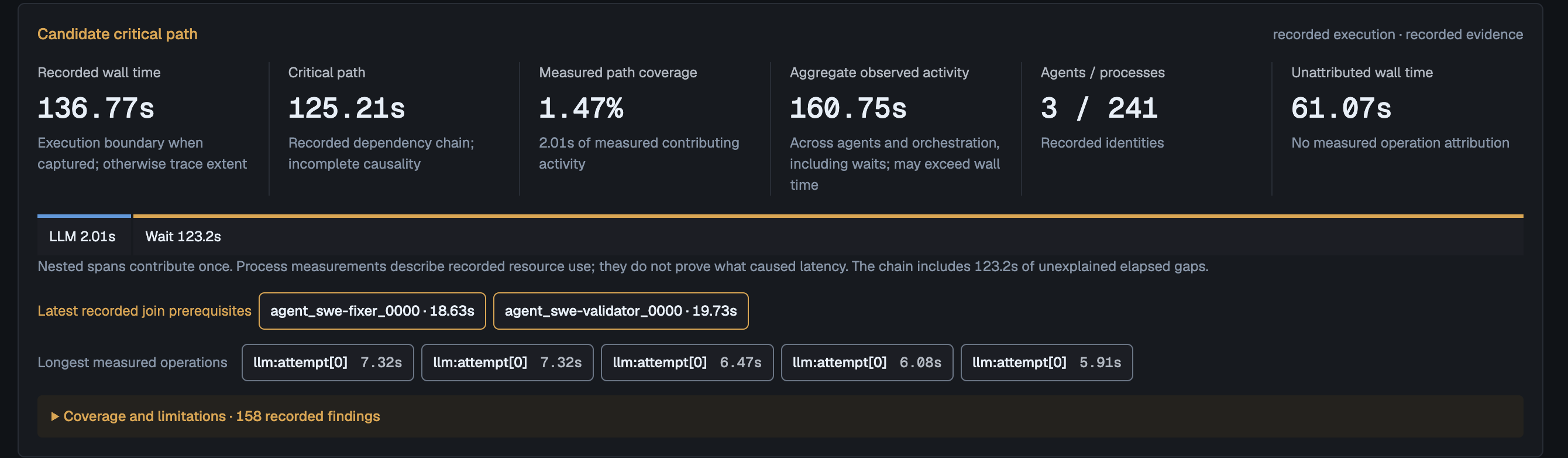
Critical Path — Find what’s slowing you down
See where wall-clock time actually goes.
Trace model requests, tool calls, processes, and dependencies across agents. Identify the work determining completion time, distinguish parallel execution from waiting, and zoom into bottlenecks.
Use the Critical Path Profiler after execution to investigate what held the run back.
Detailed Profiler — Go deeper
Dig into the measurements behind execution.
Explore LLM latency, token usage, tool durations, errors, retries, CPU, memory, I/O, and optional GPU metrics. Follow linked records from high-level activity down to individual events and processes.
No invented numbers. Missing measurements stay missing.
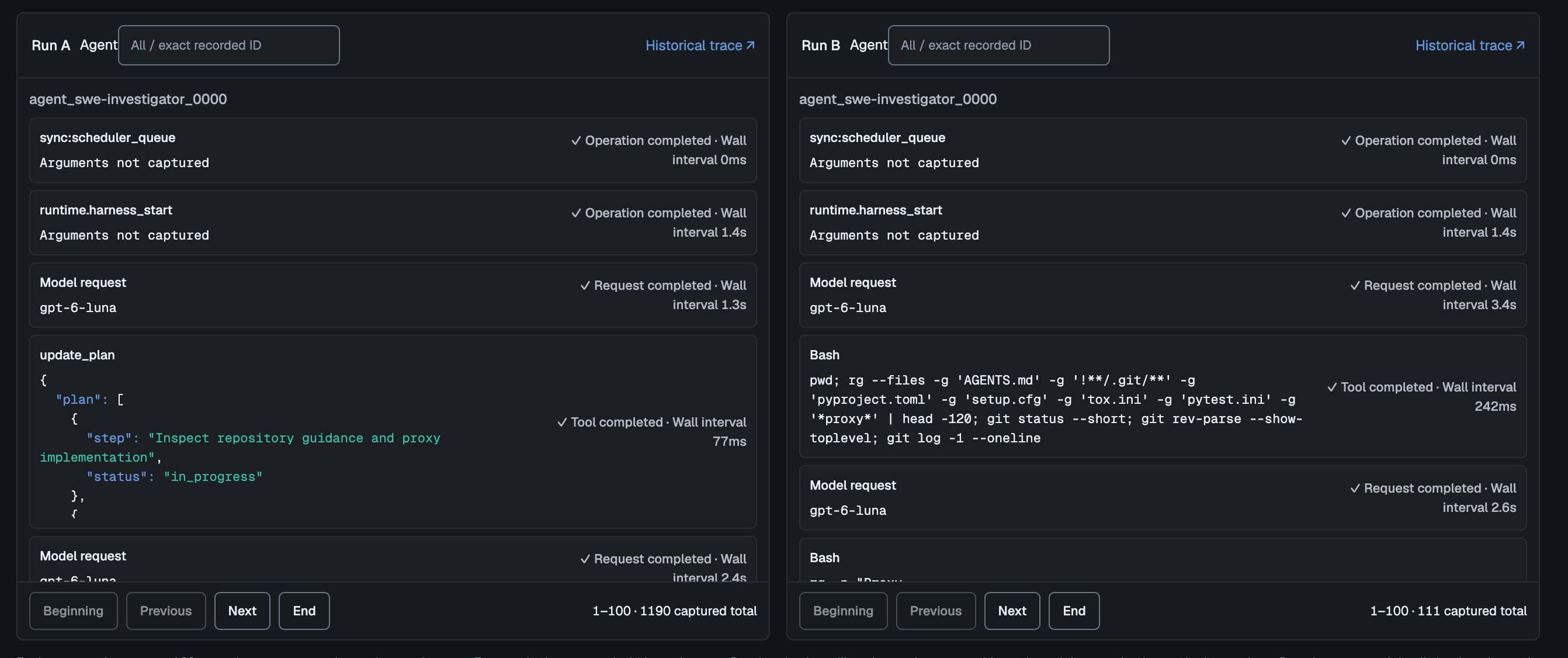
Compare Runs — Understand what changed
Compare completed runs side by side.
Examine execution trajectories, model and tool activity, latency, resource usage, failures, and outcomes. Find where execution paths diverged and which measurements changed.
Agency compares recorded evidence, without guessing at causes.
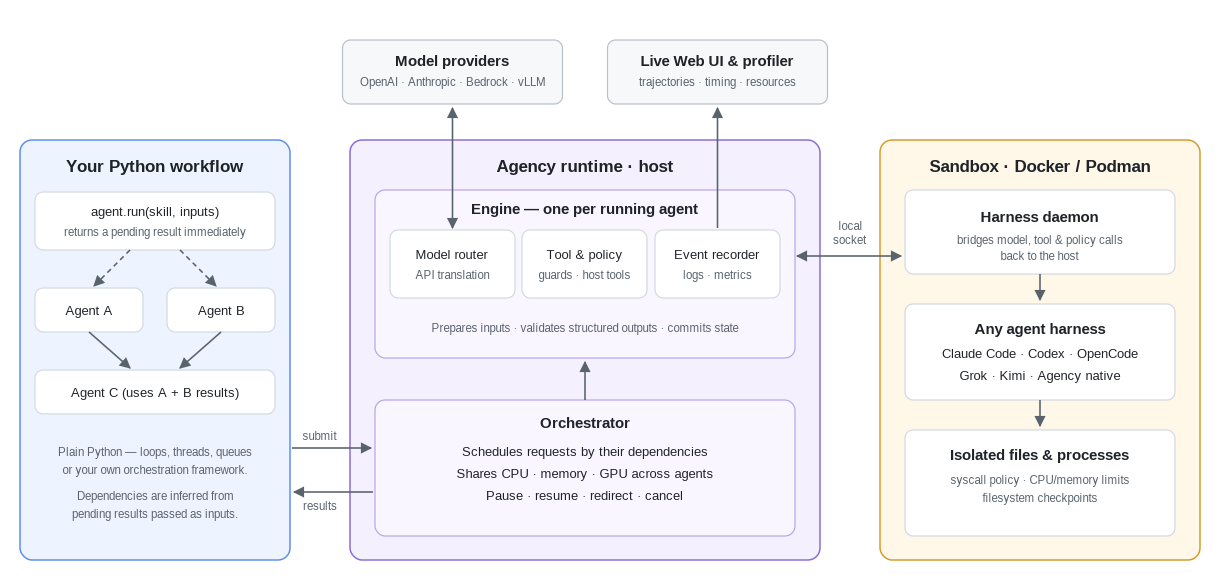
Underneath your agent stack
Agency provides a sandboxed execution environment, Python API, supported agent harnesses, and integrated telemetry. Your application keeps control of its workflow and orchestration.
| Layer | Supported options |
|---|---|
| Agent harnesses | Native, Claude Code, Codex, OpenCode, Grok, Kimi |
| Model backends | OpenAI Chat Completions / Responses, Anthropic, Amazon Bedrock, OpenAI-compatible endpoints (including vLLM) |
| Environment | Linux sandboxes using Docker or Podman, with configurable resources and mounts |
Compatibility depends on model capabilities, configuration, and external CLI versions. The external harness CLIs are installed at their pinned versions with agency install-harnesses (see Configuration).
Experimental: Integration with existing Claude Code and Codex CLI sessions on Linux is experimental. Profiling, interception, and execution controls may be limited. Python-orchestrated workflows currently provide the most complete experience.
See configuration and requirements.
Getting started
Requirements
- Linux x86-64 and Python 3.12+
- Git and uv
- Docker or Podman
- API key for your configured model provider
Install and run
git clone https://github.com/agency-project/agency.git
cd agency
uv sync --locked --python 3.12
agency install-harnesses codex

export OPENAI_API_KEY="your-api-key"
export OPENAI_MODEL="gpt-6-luna"

uv run python examples/quickstart.py
This runs a native agent in an isolated sandbox. The configured model must support reasoning_effort="none". Model API usage may incur charges.
First startup requires network access for the sandbox image and dependencies.
Launch the dashboard
AGENCY_PROFILE=1 AGENCY_PROFILE_SCOPE=workload \
  uv run python examples/quickstart.py --webui
Open localhost:7860 for live execution and localhost:7860/profiler for profiling.
The dashboard binds to 0.0.0.0 by default; don’t expose it to untrusted networks without appropriate access controls.
For Python integration, see examples/quickstart.py. You can configure the harness and model independently, define tasks with typed inputs and outputs, and collect execution records for later analysis.
Documentation
- Getting Started — Installation and first run
- Configuration — Harnesses, models, and environments
- Profiling — Recording and interpreting execution
- Examples — Agent workflows and integrations
- API Reference — Python interfaces
- Architecture — Runtime and system design
Contributing
Agency is open source. Contributions, bug reports, and feedback are welcome.
See CONTRIBUTING.md to get started.
Citation
If you use Agency in your research, please cite System Optimizations for Cost-Efficient Agent Harnesses:
@misc{agency2026costefficientharnesssystems,
      title={System Optimizations for Cost-Efficient Agent Harnesses},
      author={Jongseok Park and Jiaxiang Yu and Eric Zhou and Tony Hong and Sunga Kim and Yusuf Afifi and Ian Wong and Ion Stoica and Alvin Cheung},
      year={2026},
      eprint={2611.12122},
      archivePrefix={arXiv},
      primaryClass={cs.AI},
      url={https://arxiv.org/abs/2611.12122},
}